Care of every clean best of the world of networks and computer and technology world and we will provide any related subject in the world of networks,computer and technical .
Thursday, August 26, 2010
MIniXP-MultiBootCD

Maintenance of the cylinder will not find in the strength of content instance, contains the strongest FSX protection systems for emergency work trampling and contain two types of windows and definitions of some of the pieces of equipment and in some ways to find out the efficiency of the Hard Disk
Wednesday, August 25, 2010
ClamWin Free Antivirus 0.96.1

TuneUp Utilities 2010 9.0.4300.7

يعتبر من أقوى برامج الصيانة طبعا من لايعرف هذا البرنامج الرائع الحائز على عديد من جوائز بتسريع جهازك ويحافظ على قوته وخلوه من أخطاء التي تحدث لكل حاسوب ويقوم بمعجالة الذاكرة وأسترجاع الذاكرة المفقودة ويقوم بتنظيف القرص الصلب من الملفات الغير مرغوب بها وليس لها أي فائدة للحاوسوب وتستطيع تحكم بهاذا البرنامج بجميع نوافذ الويندوز وله الكثير من مميزات الرائعة والقوية جداً ويستطيع البرنامج أسترجاع ملفاتك ألتي حذفتها نهائياً من قرص صلب بكل سهولة وكذالك يحتوي البرنامج على تحكم بستايل الويندوز وتفيير شكل الويندوز والكثير من مميزات التي سوف تجدها في هذا العملاق فعلا برنامج رائع
TuneUp Utilities makes Windows faster, more secure, and comfortable. All important aspects of system configuration, security, cleaning and maintenance are combined under a modern graphical user interface
Media Player Classic HomeCinema
1.3.2191.0
(x86/x64)
Panda Internet Security 2011 16.00.00

حماية كاملة وأمن انترنت قوي البرنامج يوصف بانه ملك الحماية العالمية معه تستعمل
الإنترنت براحة بال كاملة , يحمي معلوماتك السرية , ويبقي لصوص الانترنت والهكر
خارج نطاق الكومبيوتر, يمنع سرقة المعلومات المهمة والمصرفية , وتبقى حاسوبك
الشخصي خالي من الفيروسات وملفات التجسس ورسائل الدعاية و يحمي اطفالك
على الإنترنت البرنامج الوحيد الذي يضمن لك انه يكشف اكثر من مليون فيروس
وتهديدات اخرى , فهو يقدم حماية لمستوى اعلى من الحماية ويقوم بمحاربة
المتطفلين من هكر وغزاه كمبيوتر وبرامج تجسس يحتوي البرنامج على اقسام
Kaspersky Rescue Boot Disk 11 ISO (Update August 23, 2010)
(Update August 23, 2010)

Saturday, August 21, 2010
أعلنت سيسكو الحرب على مهربي الأسئلة
Friday, August 20, 2010
![]()
إستحوذت عملاق تصنيع المعالجات “شركة انتل” على شركة مكافي المتخصصة في مجال أمن المعلومات, وبلغت قيمة صفقة الإستحواذ 7.68 بليون دولار، علمًا أنه لن يتم دمج الشركة مع انتل بل ستكون شركة فرعيه مستقله عن شركة أنتل المالك الجديد لها.
وتعتبر شركة مكافي من أكبر شركات أمن المعلومات وبلغ أرباح دخلها صافية في عام 2009 بليونين دولار.
Thursday, August 19, 2010
Friday, August 6, 2010
نظام العملاق ماكنتوش
Thursday, August 5, 2010
Storm Controlخاصية مفيدة وهامة لحماية الش
How to Use Dropbox with an iPhone or iPod Touch
If you own an iPhone or iPod touch and want to always have access to important files in your Dropbox, installing the free Dropbox App is a must. It’s free, easy to use, and can help keep your work organized while on the go.
Download and Install with iTunes
First you’ll need to get the Dropbox app, and there are several ways to do it. Here we look at getting it on your computer through iTunes first. Go to the Dropbox iTunes preview site (link below) and click View In iTunes.
Add the Quick Launch Bar to the Taskbar in Windows 7
You should note that the new Windows 7 taskbar allows you to dock items to the taskbar, combining the features of both the normal taskbar as well as the Quick Launch. For more on this, be sure to read through our coverage of the Windows 7 beta if you haven’t already.
How To Add Other Languages to Office 2010
If you’ve purchased a new computer that came with Office in a different language than your preferred language, you may have difficulty using it. Most English speakers would have trouble using a version of Office in another language, but native speakers of other languages may feel just as out of place with a English copy of Office.
Change Your Wi-Fi Router Channelto Optimize Your Wireless Signal
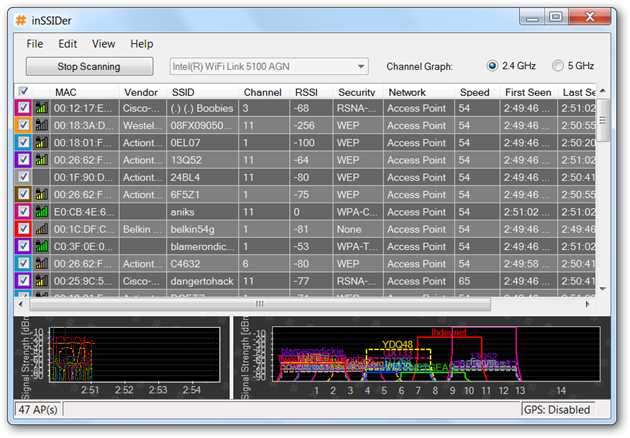
If you live in an apartment complex you’ve probably noticed more than just the passive-aggressive network IDs that your neighbors use—very likely you’ve had problems with your wireless connections dropping out, or just not being as fast as you’d like. Here’s a quick fix. Of course, this isn’t the only thing you need to do to make sure your wireless network is running at maximum speed, but for today’s lesson we’ll show you how to pick the right channel to make sure you can stream the new Futurama episode to your laptop without skipping. Note: if your Wireless network is working fine, please don’t mess with it. Or at least, don’t blame us if you break it. Figuring Out the Right Wi-Fi Channel The first thing you need to do is grab yourself a copy of the free inSSIDer utility, which will scan your wireless network and probably reveal some humorous names from your weird neighbors. If only they could learn how to park their cars like decent human beings.
Let’s take a closer look at that window… you’ll need to choose the right channel band, depending on the router you are using. Mine is a Linksys dual-band Wireless-N router, which has two separate networks… if you aren’t sure, go for the 2.4 GHz one first, and then click the Start Scanning button. Note: If you have more than one network card enabled, make sure the drop-down has your wireless card selected.
Ideally you’ve selected the right one, and after waiting for a minute or two, you’ll see your network in the list. For example, my test network is called lhdevnet, and it’s currently running on channel 6. If you looked closely at the screenshot earlier, you’d see that there are loads of networks in my apartment complex using the same wireless channel.
Looks like it’s time to change the channel. Hopefully Futurama is on. Change Your Wireless Channel If you’re using a Linksys router, you’ll need to browse to the address of your router, which is probably set to http://192.168.1.1 but could be assigned to another address. You can run a quick ipconfig command at the command prompt to check:
In my case the address is different (because I changed it, of course), but what you’re looking for is the Default Gateway for your Wireless connection, and then go to http:// My router has two separate bands, but your router might just have a single band here. In my case, what I’ve done is set the 2.4 GHz band to only be used for Wireless-G, and the 5GHz one to Wireless-N only. Since I’m not having any problems with the Wireless-N settings, I’ve left those on auto.
Where I am having a problem, however, is my Wireless-G devices—so what I’ve done is chosen channel 9, since it’s the only channel that’s not being used by any of my neighbors, who are using mostly channels 1 and 6, though a few are using 11 as well. Channels 1, 6, and 11 are the most common channels to choose, and most routers will use one of them as the default channel—but the general idea is to be as far away from everybody else as you can.
Note: I’ve also configured my router for 20 MHz only on the 2.4 GHz Wireless-G band, just because that was the only way it would let me choose the standard channel manually. If you are using a different router, the IP address will generally be the same, but you’ll have to figure out how to change the Wireless channel without any screenshot tours. It’s usually fairly easy, though, once you know what you’re looking for. Fun Technical notes If you look closely, you’ll notice that each of the channels are 5 MHz away from each other, but the Channel Width for 2.4 GHz is actually 20 MHz. What this means is while that the channel might be set to channel 6, it’s also partially using 5 and 7, and probably slightly interfering with 4 and 8. |
Desktop Fun: Bridges at Night Wallpaper CollectionBridges come in all shapes and sizes across the world but when viewed at night they can be very beautiful. If you love mixtures of architecture and lighting then enjoy looking through our Bridges at Night Wallpaper collection. Note: Click on the picture to see the full-size image—these wallpapers vary in size so you may need to crop, stretch, or place them on a colored background in order to best match them to your screen's resolution |
Desktop Fun: Abstract Textures Wallpapers
Sometimes an image from a favorite movie or the outdoors is perfect for our desktops, but what if you prefer something with a pattern or texture? Then enjoy browsing through our Abstract Textures Wallpaper collection.
Note: Click on the picture to see the full-size image—these wallpapers vary in size so you may need to crop, stretch, or place them on a colored background in order to best match them to your screen's resolution.
Install VMware
If you don’t have it already, download and install VMware Workstation (link below). If you already have the free VMware Player installed, you’ll be prompted to uninstall that first. Don’t worry about losing any VMs that you created in Player as Workstation comes with a version of Player as well.
Monday, August 2, 2010
War Rock
WAR ROCK ON LINE GAME
النوع MMOFPS
لعبة حربية من الدرجة الأولى ...
ال Classes الى فيها كالأتى
.............
How To Do BGP ?
وصلنا اليوم إلى القسم الثالث من شرح بروتوكول الـBGP والذي سوف أخصصه لشرح كيفية عمل البروتوكول بشكل عام منذ أول لحظة لتشغيله وصولا إلى اللحظة التى يبدأ فيه بتوجية الترافيك إلى مخدمات أنترنت آخرى وسوف يتضمن الشرح أيضا كيفية أعداد البروتوكول على الروتر
كيف يعمل بروتوكول الـBGP ؟
بداية أحب أن أذكر بأن بروتوكول الـBGP يعمل على الطبقة الرابعة وهو يستخدم الـTCP لتمرير الترافيك والأتصال مع الروترات الموججودة في AS آخرى وكما هو معروف عن الـTCP بأن أول شيء يقوم به هو فتح جلسة أو Session مع الطرف الآخر لذا الخطوة الاولى هي فتح جلسة مع الطرف الآخر من خلال البورت 179 الخاص بي بروتوكول الـBGP وأحب أن أعبر عن هذه الخطوة باللغة الأنكليزية بي establish connections with the other BGP router والخطوة الثانية هي تبادل الـRouting Table مع الطرف الآخر وهو يقوم فيها مرة واحدة فقط وبعدها يقتصر التبادل بين الجاران على شكل تحديثات فقط Update message ومن هنا أحب أن اذكر انواع الـ Messages التي تتم بين الروترات في الـBGPوهي كما مذكورة في الـ RFC 1771 أربع انواع بينما نجد في RFC 2918 قد تم أضافة نوع خامس وهم بالترتيب التالي :
Open message: وهي تستخدم اول مرة من أجل عمل اتصال بين الروترين او كما يتم التعبير عنهم PEERS ومحتويات الـHeader على الشكل التالي:
Optional parameters | Optional parameters length | BGP identifier | Hold-Time | Autonomies system | Version |


![image[25] image[25]](http://www.howtogeek.com/wp-content/uploads/2010/07/image251.png)